Focus Flow Gray - Chrome Extension for Reading Without Distractions
I was reading a 5000-word article about database indexing. Every paragraph had blue links to other articles. The scrollbar on the right kept reminding me how much was left. The page had red code blocks, green success messages, yellow warnings.
Ten minutes in, my eyes hurt. I closed the tab.
I tried Safari's Reader Mode. Works on some sites, breaks on others. Documentation sites? Forget it. I tried printing articles to PDF - four clicks just to read something. I installed three different "reading extensions" from the Chrome store. They all added toolbars, settings panels, feature lists. More clutter, not less.
So I built Focus Flow Gray. One click. Scrollbar gone, everything turns gray, links blend with text. Done.
The problem with reading online
Web pages fight for your attention. Scrollbars, blue links, bright colors, flashing ads. Your brain processes all of it, even when you're trying to focus on the text. You read slower, understand less, get tired faster.
Browsers are built for browsing - click links, scroll endlessly, stay engaged. Not for sitting down and reading 20 pages of documentation without interruption.
What Focus Flow Gray does differently
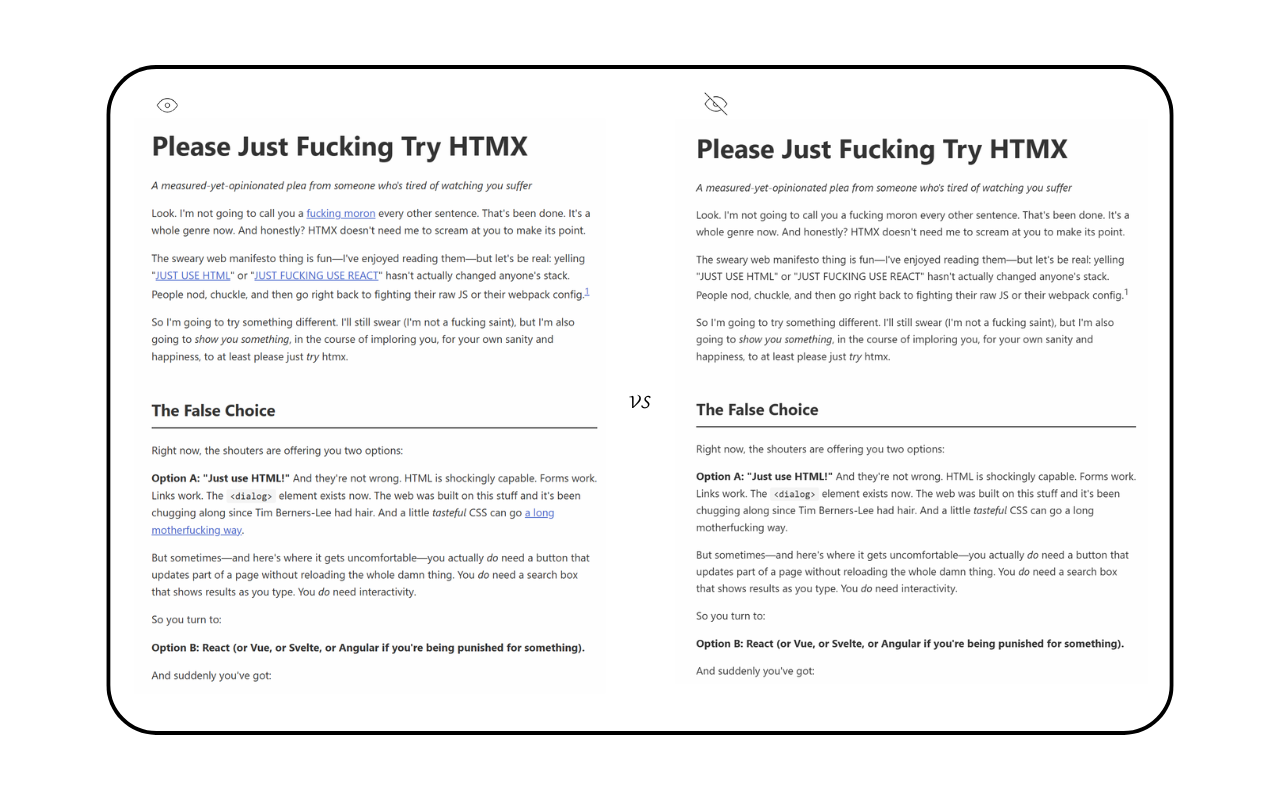
Install it, click the icon. Three things happen:
- Scrollbars disappear (scrolling still works)
- Everything turns gray
- Links look like regular text
Takes 0.15 seconds. No page reload, no configuration, no setup wizard.
You can control each feature separately if you want - three toggle buttons in the popup. But I usually just click the icon once and everything turns off. Click again, everything turns back on.
The three features
Hide Scrollbars
Scrollbars take up 15-20 pixels. On my 13-inch laptop, that's 3% of screen width.
But the real problem isn't space. It's the constant reminder that there's more content below. Your eyes drift to the scrollbar, you check your progress, you think about how much is left. Breaks focus every time.
Hide them. Scrolling still works with mouse wheel, trackpad, arrow keys. The scrollbar just doesn't show up.
Grayscale Mode
Websites use colors to grab attention. Blue links, red buttons, green success messages, yellow warnings. Every color pulls your eyes away from the text.
Grayscale turns everything black, white, and gray. Text stays readable. Headlines stay clear. But nothing screams for attention. Your eyes stop jumping around. You read the words in front of you instead of processing a dozen colors at once.
Takes 0.15 seconds to transition. Hardware accelerated, no lag.
Hide Links
Blue underlined text is a magnet for your eyes. Every paragraph with links becomes harder to read because your brain keeps noticing the blue text.
With this on, links look exactly like normal text. Same color, no underline. When you hover your mouse over one, a subtle underline appears. Move away, it disappears.
Links still work. They just don't break your reading flow.
How I actually use it
Reading documentation: Last week I spent three hours reading Postgres documentation. Every sentence had blue links to related pages - indexes, queries, performance tips. Without Focus Flow Gray, I'd click five links per page and lose track of what I was learning. With it on, I read straight through. Finished faster, understood more.
Online articles: I read Paul Graham essays, Hacker News links, technical deep-dives. These sites are designed to keep you clicking. Turn on Focus Flow Gray and they become just text on a page. Like reading a book.
Academic papers: ArXiv papers, research PDFs, anything with reference links every other sentence. The colored citation links destroy focus. Grayscale makes them blend in. I get through papers in one sitting instead of getting distracted halfway through.
News sites: CNN, BBC, tech blogs. Red headers, blue links, yellow ads. I can't read three paragraphs without my eyes jumping around. Focus Flow Gray strips all that out. Just the article, nothing else.
Why Focus Flow Gray over alternatives
Browser Reader Mode: I tried Safari's Reader Mode for two months. Works great on blog posts and news articles. Fails completely on documentation sites, GitHub READMEs, forum posts. Breaks formatting on half the sites I visit. No control over what gets stripped out.
Print to PDF: Four clicks: right-click, print, change settings, save. Then I have a PDF file to manage. Can't click links, can't interact with the page. If the content updates, my PDF is outdated. Too much friction for a 10-minute read.
Other reading extensions: I installed five different ones. They all did the same thing - added toolbars, settings panels, feature toggles, account systems. One showed me "reading stats." Another had a library system. I wanted less clutter, not more.
Focus Flow Gray removes distractions. Doesn't add features, doesn't have settings, doesn't track anything. One click, everything gets quiet.
Privacy and performance
No servers. No analytics. No tracking. Everything runs in your browser.
The code is under 50KB. Uses hardware acceleration for the grayscale transition. Doesn't slow down page loads or eat memory.
Chrome's Manifest V3, so it's sandboxed and can't access stuff it shouldn't.
Who should use this
Use this if you:
- Read documentation, articles, or papers online for more than 30 minutes at a time
- Get headaches from bright web pages
- Find yourself clicking links mid-paragraph and losing your place
- Want less, not more
Don't use this if you:
- Rarely read long-form content online
- Need colorful syntax highlighting visible at all times
- Want features like highlights, annotations, note-taking
- Mostly browse visual content or social media
Technical details
Grayscale uses CSS filters. Scrollbar hiding uses custom CSS rules. Link hiding applies styles that blend links with text, with hover states for when you need them.
Settings stay in Chrome's local storage. Each tab remembers its own state. Open a new tab from one with Focus Flow Gray on? The new tab inherits the settings automatically.
Works on 95% of websites. Some sites with weird custom scrollbars or CSS might need a refresh. Documentation sites, blogs, news sites - all work fine.
Bottom line
I built this because reading online was exhausting. Bright colors, blue links, scrollbars - everything fighting for attention. Reader Mode didn't work on most sites I needed. Other extensions added more clutter.
Now I click one button and pages get quiet. I read faster, understand more, and don't get headaches after 30 minutes.
If you read documentation, long articles, or technical papers online, try it. Free, no tracking, does one thing well.
Install link: Focus Flow Gray - Chrome Web Store